Airthings View Radon Review: Worth It? (November 2026)
The Airthings View Radon suits you if you want a display, app access and Wi-Fi readings from a continuous radon monitor. Choose the Corentium Home for portable on-screen averages, or the Wave Radon if app access over Bluetooth fits your routine.
On this page (8 sections)
The Airthings View Radon is a dedicated Wi-Fi radon monitor with a built-in display, app access and an online dashboard. It suits you if you want to check readings at home or remotely and also track humidity and temperature.
Its main trade-off is that the extra connectivity may be more than you need. If you only want averages on a portable screen, consider the Corentium Home; if checking over Bluetooth is enough, the Wave Radon is another option.
The Airthings View Radon at a glance
The View Radon combines radon, humidity and temperature monitoring with a customizable eInk screen and Wi-Fi access. It can run on batteries or USB power, and Airthings says battery life can reach up to 3 years.
Airthings 2989 View Radon: Best for Wi-Fi access and a display

- Wi-Fi connection
- Customizable eInk display
- Radon, humidity and temperature readings
- Battery powered
A dedicated radon monitor for people who want a built-in screen and remote access to readings. It also tracks humidity and temperature.
Pros
- Wi-Fi access through the app and online dashboard
- Display shows up to four values
- Can run on batteries or USB power
- Can act as a hub for other Airthings devices
Cons
- Costs more in features than a basic portable monitor
- Some readings and graphs require the app or dashboard
A hand wave can trigger sensor levels on the display, which can show up to four values. The app and online dashboard offer complete readings, graphs, notifications and insights for more detailed checks.
The device can also work as a hub, bringing other Airthings devices online when connected to Wi-Fi or USB. That feature matters most if you already use compatible Airthings monitors.
Who should choose the View Radon?
Choose the View Radon if you want remote access to radon readings without relying on a phone being nearby. Wi-Fi access through the app and dashboard makes it suited to checking trends while away from home.
The built-in screen is useful for quick checks where the monitor sits. You can customize what it shows, while the app gives you the fuller view of readings and trends.
It can also suit a home where humidity and temperature readings are useful alongside radon monitoring. These extra measurements don't replace dedicated tools when you need precise readings for another purpose.
Consider a simpler monitor if you don't need Wi-Fi, an online dashboard or the hub feature. The best Airthings radon detector guide compares options by the kind of reading access you want.
What does Wi-Fi add to a radon monitor?
Wi-Fi lets you view data through the app and online dashboard, including graphs, notifications and insights. That can make it easier to keep up with readings when you're away from the room where the monitor sits.
A Wi-Fi connection doesn't change what radon is or how you should interpret a result. Readings over time are more useful than a single snapshot because indoor radon levels fluctuate.
The View Radon can also serve as a hub for other Airthings devices. If you don't own other compatible monitors, that role may not affect your decision.
If you're comparing the View Radon with a monitor that measures more air quality factors, see our Airthings View Plus review. The View Plus is a broader monitor, while the View Radon is dedicated to radon, humidity and temperature.
How does its display work?
The View Radon's eInk display offers a quick local check without opening the app. Its Calm Tech Display settings let you choose which values appear, and a hand wave triggers sensor levels.
The screen can show up to four values, but Airthings directs users to the app for complete readings. Use the display for a glance and the dashboard when you want graphs or a fuller record.
This arrangement can work well in a shared space where you want visible information without keeping a phone open. If you prefer all readings on the device itself, the Corentium Home's on-screen averages may be a better fit.
Battery power, USB and placement
The View Radon is battery powered and can also use a USB cable. Airthings states a battery life of up to 3 years, though actual runtime depends on conditions and use.
Pick a stable spot where the monitor can remain in place for ongoing readings. Avoid moving it often if you want a consistent picture of one room over time.
The included kit has 6 AA batteries and a USB cable. USB can also let the View Radon act as a hub for other Airthings devices.
Before choosing a location, follow Airthings' setup guidance and any local radon testing advice. A monitor's placement can affect how representative its readings are of the area you want to understand.
View Radon vs Corentium Home vs Wave Radon
The View Radon is the pick for Wi-Fi access and a built-in display. The Corentium Home prioritizes portable on-screen averages, while the Wave Radon provides app checks over Bluetooth and can connect to an Airthings Hub for online access.
| Product | Best for | Connectivity | Display | Sensors | Our score |
|---|---|---|---|---|---|
| Airthings 2989 View Radon | Wi-Fi access and a display | Wi-Fi, app and online dashboard | Customizable eInk screen | Radon, humidity and temperature | 9.5 |
| Airthings Corentium Home Radon Detector 223 Portable | portable on-screen averages | On-screen readings | 9.7 | ||
| Airthings 2950 Wave Radon | Bluetooth app checks | Bluetooth; Smartlink can connect with Airthings Hub | Radon, humidity and temperature | 9.6 |
The Corentium Home displays daily, weekly and long-term averages directly on its screen. It uses 3 AAA batteries and is designed to move between rooms, but it lacks Wi-Fi remote access and humidity and temperature readings.
Airthings Corentium Home Radon Detector 223 Portable: Best for portable on-screen averages
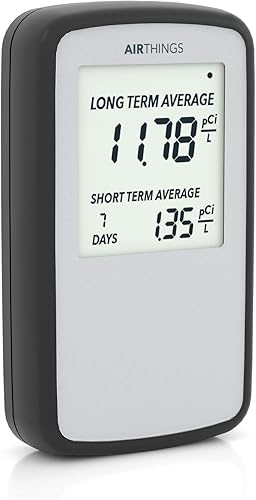
- Portable battery-powered monitor
- Daily, weekly and long-term averages
- Short-term readings on screen
A simple portable option if you want short and long-term radon readings on the device itself. It does not offer the View Radon's Wi-Fi dashboard.
Pros
- Daily, weekly and long-term averages appear on screen
- Battery powered for moving between rooms
- Can generate a radon self-inspection report
Cons
- No Wi-Fi remote reading access
- Does not include humidity and temperature monitoring
The Wave Radon tracks radon, humidity and temperature, with short and long-term results available in the app over Bluetooth. It has no built-in display, and online access requires an Airthings Hub.
Airthings 2950 Wave Radon: Best for Bluetooth app checks
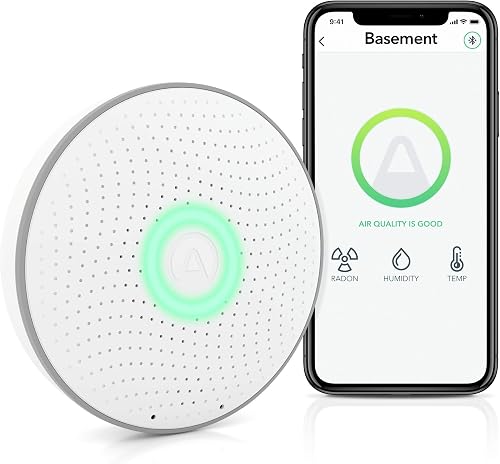
- Continuous radon monitoring
- Humidity and temperature readings
- Bluetooth app access
A battery-powered choice for checking radon trends in the Airthings app over Bluetooth. Wi-Fi access requires an Airthings Hub.
Pros
- Checks short and long-term readings in the app
- Tracks humidity and temperature
- Can connect to an Airthings Hub for online access
Cons
- Bluetooth checks require the phone to be in range
- No built-in display for readings
For more on the broader View Plus model, read about Airthings View Plus radon accuracy. That guide helps separate a monitor's features from the question of how to interpret its readings.
Can the View Radon replace a radon test?
A continuous monitor can show how readings change over time, but use local public health guidance to decide whether you need a formal test or mitigation. The monitor's graphs and notifications can help you follow trends, but don't treat one short reading as a complete assessment.
For a simple explanation of the role and limits of these devices, see what a radon detector does. Follow the instructions for your monitor and any local requirements when making decisions about a home.
If a reading is high or you need a result for a real estate transaction, check the rules and testing options in your area. A qualified radon professional or local health department can explain the next step.
Is the View Radon worth choosing?
The View Radon is a strong fit if you want Wi-Fi remote access, a built-in display and humidity and temperature readings in one dedicated monitor. Its extra connectivity is useful when you plan to check data away from home or use the device as a hub.
Pick the Corentium Home if portable on-screen averages matter more than remote access. Pick the Wave Radon if Bluetooth app checks are enough; for a wider sensor set, compare Airthings View Plus vs Wave Plus.
A radon monitor helps you follow levels over time, but it doesn't replace local guidance on testing or mitigation. Choose based on where you'll place it and how you want to review the data.
Frequently asked questions
Does the Airthings View Radon need Wi-Fi?
The View Radon connects to Wi-Fi for access through the Airthings app and online dashboard. It can also operate wirelessly on batteries, but remote access depends on connecting it to Wi-Fi; a USB cable can power it and let it act as a hub for other Airthings devices.
Can you read the Airthings View Radon without the app?
Yes. Its customizable eInk display can show up to four values, and waving a hand in front of it triggers sensor levels.
The app and online dashboard provide complete readings, graphs, notifications and insights, so use the screen for quick checks and the app for more detail.
How is the View Radon different from the Corentium Home?
The View Radon adds Wi-Fi access, an app and dashboard, a customizable display, and humidity and temperature readings. The Corentium Home focuses on portable on-screen radon averages, including daily, weekly and long-term readings, without remote Wi-Fi access.
Does the Airthings View Radon measure radon continuously?
Airthings describes the View Radon as a continuous monitor. Radon levels can fluctuate, so use readings over time to understand exposure rather than treating a brief reading as a complete picture; follow local guidance on testing and mitigation if levels concern you.


